
Smartphone Security Tips
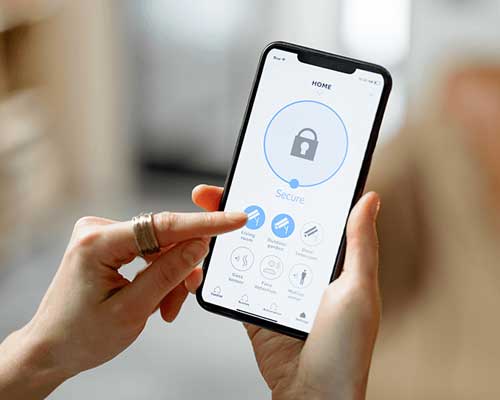
The increase in popularity of both iPhones and Androids mean that our mobile devices are now used for more than just phone calls and text messages. The app market is now more expansive than ever before meaning that we can shop, bank, and complete many other tasks no matter where we are in the world.
Now a day’s technology rapidly advancing every single year, it is becoming harder than ever to keep our details safe on devices connected to Internet. Even today, Verizon reported a massive data breach whereby 1.5 million customer's information was stolen. Also today, our beloved Google patched 4 vulnerabilities that were exploited by exploiters to take over computers. Google Chrome version 49.0.2623.108 is the latest patched version so you must update regular basis.
Although this is fantastic news as far as efficiency goes, it also means that the security risks are high and the shocking truth is; there are more pieces of malware being created with every passing day. The iPhone has long had the upper hand over Android as they have placed intense focus on exactly what apps make it to their store; something that Android doesn't do quite as well. Secondly, Apple being the manufacturer or the hardware and the creator of the software running on it, sandboxes apps to not be able to access other parts of the phone software and data than the areas the app has been authorized to access to perform its function.
However, creators of malware are starting to focus their attentions on mobile because they know just how many people they can target. According to a recent survey, nearly 95% of all Americans use either an iPhone or an Android device. Just recently, WireLurker, a dangerous piece of malware for iOS devices, was found attacking devices in an attempt to skim important information, send spam emails or even to freeze the phone completely until a fee is paid. With so much crucial data stuck in these phones and computers, many pay the price to get it back because the loss may be priceless.
Tips are follows
Always Use Strong Password
A password will stop the possibility of someone installing spyware onto your device. Once installed, spyware can easily track your phone calls, text messages and even your media such a photos and videos. Of all the phones scanned in the US last year, 0.24% of people had spyware that was targeting them specifically. Although this percentage may seem relatively small, it is still a significant amount of people considering just how many people are using smartphones nowadays.
Another point to consider when deciding whether to set a password or not is if you were to lose your phone. Without a password, whoever ends up with your device will have access to almost everything with a quick swipe on the screen. When deciding on a password, try not to use something simple like 1111 or 0000! You need to make it nearly impossible for anyone to gain access so choose a mix of numbers that mean something to you so you won’t forget.
Always Log Out
Firstly, if you're banking at all, you should be using the bank's official app as this provides the best security. Apps are encrypted and will protect your information. It also saves you clicking on a potentially "fake" link when on a browser. Perhaps the most important thing to remember is to log out of whatever you use, whenever you are finished, as this will immediately cut the possibility of any hacker accessing your financial information. Although it may seem annoying to constantly type in your password, those few seconds each time could save you a lot of problems in the future.
Free Public Wi-Fi: Public Wi-Fi is fantastic if you are out and about and need to access the internet for something urgently, but you should always be careful and choose one that has a password. A password means that the network is secured and hackers will not be able to view web traffic, passwords, emails etc. If you're in a public place like a cafe or restaurant and the Wi-Fi is asking for a password, an employee will happily give it to you if it is for public use. You can stay safe in the knowledge that you are using a secure connection.
If you simply cannot avoid an unsecured network (if you go travelling, for example), there are encryption apps available, such as "Freedome", which will help to keep you safe.
Collect Security Apps
The app market is dense with music apps, gaming apps, fitness apps, and the list goes on. You will also find security apps like "Lookout" and "Avast Free Mobile Security". Whether you think you have a harmful app or whether you just want to check the health of your device in general, using one of these apps will allow you to do so and can provide peace of mind. Be sure to check and confirm they have a lot of reviews (especially positive reviews).
Security apps now do more than just scan apps though, you can also find your device when lost, set an alarm or message if somebody finds it and even back up or delete important information online. This means that if your phone does end up in the wrong hands, they will find nothing but a blank phone reverted back to factory settings.
Get Permissions
Whilst Apple is quite good with checking the apps that get onto the store, Android have been criticized in the past for a lack of strict control and this can lead to adware on your device. We sometimes scan the store looking for a new game or a flashy new app and proceed to download it without knowing that we're also downloading adware at the same time. The most common way this is conducted is through advertisements. Those innocent looking ads could actually land you in a world of trouble.
For this reason, it is wise to read through exactly what the app is requesting from you in the shape of "permissions". If you find a clone of a popular game and it wants to access private details, it is probably best to leave that one well alone. Sometimes it can be too late though and you may have already downloaded the app! What should you do then? Delete it as soon as possible and think about downloading a security app to assess the damage.
Install Updates Regularly
For protect your phone, you should install any updates that are available as soon as possible. This doesn't just apply to your device updates but updates to your apps too. The manufacturer of your smartphone, your cell phone service carrier, and the company / companies running software on your cell phone are working hard to detect security problems and fixing them or patching them in their code, but you need to install the patched/updates in order to benefit from all the work that they do. True, it may use your precious data (especially if you have limited and needed amount in your plan), but it is better to pay a few bucks than risking data breach if you think you may forget by the time you reach your home or work wi-fi.
Do not Download From Unknown Sources
This is an option that is available to Android users only, and became even more important recently as "NotCompatible C" was discovered. This allowed hackers to remotely use someone's mobile phone without permission. Many operations would see the hacker purchase a number of tickets through the unsuspecting victim's phone with no trace to them whatsoever. The source of this malware was traced back to certain websites and emails so checking the "disable app downloads from unknown sources" option in the settings can easily prevent this from occurring.
Limit Risky Activities on your Smartphone
Although some hackers can be extremely clever in how they infiltrate your device, one of the leading causes of mobile phone problems is still poor choices when it comes to downloading apps and files. Firstly, jailbreaking your device will instantly leave you open to problems as you are effectively removing a layer of security. However, if you have carried out this change to your device, you should avoid downloading anything from third-party sites or stores at all costs. Malware is far more common in these markets and so if you are unsure, install a security app to help you along. As we said in the early stages of this article, hackers are finding new ways of getting apps on the relevant stores so only using trusted developers could also prove to be a highly beneficial decision.
No Administrator Access
"Ransomware" is a term that is doing the rounds of late and for good reason as it is becoming more common as time goes on. As the title suggests, ransom-ware can effectively take charge of the phone, often because it has been allowed administrator access. It can then freeze pertinent parts of the software until a fee has been paid. The most common type last year was a "message from the FBI" where people were shelling out hundreds of dollars to regain access to their device.
If any app that you are unsure of asks for this type of access at install, decline it immediately and search the internet to see if it is safe. Once given access, it can be extremely hard to take it away and you could face a screen freeze, loss of data and even your notifications being read. This option is only available to Android users and should be considered carefully as Android does provide the "less safe" store of the two.
Final Words
Hackers are coming up with new ways of hacking devices and gaining access to your information but with some careful steps, you can protect yourself from any problems.
Add as a preferred source on GoogleRelated Mobile News & Blog
 TECNO MEGAPAD 2 features an 11-inches 2.5K Eye-Care Display with a 90Hz refresh rate, offering sharp visuals and smooth interactions for streaming, reading, browsing and everyday tasks. The display is TÜV Rheinland certified for flicker-free and low blue light performance, while the tablet's 6.6mm ultra-slim full-metal body combines portability with a premium design, according to a press release.
The tablet is equipped....English
TECNO MEGAPAD 2 features an 11-inches 2.5K Eye-Care Display with a 90Hz refresh rate, offering sharp visuals and smooth interactions for streaming, reading, browsing and everyday tasks. The display is TÜV Rheinland certified for flicker-free and low blue light performance, while the tablet's 6.6mm ultra-slim full-metal body combines portability with a premium design, according to a press release.
The tablet is equipped....English  Tecno has officially launched the Spark 50 Pro smartphone in Bangladesh. Tecno Spark 50 Pro is powered by the MediaTek Helio G100 Ultimate processor and features a 6.78-inches display with a 120Hz refresh rate. The device comes with a 6000 mAh battery supported by 60W Super Charging. The smartphone features a 50MP Sony LYTIA 600 FlashSnap main camera designed to capture detailed....English
  Helio has unveiled its latest smartphone, the Helio 46, in Bangladesh. The company positions it as a feature-rich device with a 120Hz display, a 50-megapixel rear camera, a 6,000mAh battery, and Android 16. According to the company, the Helio 46 targets consumers who prioritise performance, an advanced display, extended battery life, and a premium aesthetic at an accessible price.
Mohammad Abu Sayem,....English
Helio has unveiled its latest smartphone, the Helio 46, in Bangladesh. The company positions it as a feature-rich device with a 120Hz display, a 50-megapixel rear camera, a 6,000mAh battery, and Android 16. According to the company, the Helio 46 targets consumers who prioritise performance, an advanced display, extended battery life, and a premium aesthetic at an accessible price.
Mohammad Abu Sayem,....English  Infinix has recently launched the HOT 70 smartphone in Bangladesh. According to a press release, the Infinix HOT 70 is powered by the MediaTek Helio G100 Ultimate chipset, and features a 120Hz refresh rate display which supports up to 90 FPS gameplay. The device is backed by a 6000 mAh battery with 45W fast charging, along with bypass charging.
The Infinix HOT....English
Infinix has recently launched the HOT 70 smartphone in Bangladesh. According to a press release, the Infinix HOT 70 is powered by the MediaTek Helio G100 Ultimate chipset, and features a 120Hz refresh rate display which supports up to 90 FPS gameplay. The device is backed by a 6000 mAh battery with 45W fast charging, along with bypass charging.
The Infinix HOT....English  The increase in popularity of both iPhones and Androids mean that our mobile devices are now used for more than just phone calls and text messages. The app market is now more expansive than ever before meaning that we can shop, bank, and complete many other tasks no matter where we are in the world.
Now a day’s technology rapidly advancing every....English
The increase in popularity of both iPhones and Androids mean that our mobile devices are now used for more than just phone calls and text messages. The app market is now more expansive than ever before meaning that we can shop, bank, and complete many other tasks no matter where we are in the world.
Now a day’s technology rapidly advancing every....English  Android allows you to encrypt all the data on your de vice. You'll need a password or PIN each time the device is turned on to decode all the data. It may seem tiresome but if the phone gets into the wrong hands, there's no way to access the data without a password or PIN. It can be activated through the Android....English
  Smartphone is now like a pocket computer. Smartphones are not used just to make calls or sending SMS but also to send e-mails, making video conferences, contact via social networking sites, photos, videos, etc. Smartphone sales and demand both has increased at the present time. So before buying a smartphone, a buyer must keep in mind the following points.
* Don't just....English
Smartphone is now like a pocket computer. Smartphones are not used just to make calls or sending SMS but also to send e-mails, making video conferences, contact via social networking sites, photos, videos, etc. Smartphone sales and demand both has increased at the present time. So before buying a smartphone, a buyer must keep in mind the following points.
* Don't just....English  Vivo India announced March 25, 2026 the launch of the vivo Y21 5G and vivo Y11 5G, further strengthening its Y series portfolio with smartphones that promise endurance, offering long-lasting power throughout the day and reliable durability. Designed for consumers who rely on their devices throughout the day, both smartphones deliver dependable all-day performance, complemented by a sleek design and smooth user....English
  Hello readers, today we want to tell you five unused feature of smart phone. Now a days, information technology is growing very fast and almost everyone has smartphones. But we know that most of the user of smartphone who use of smartphones for just sending and receiving call, listening to music, resting in the Internet world and resting in self-evacuation. So most....English
  At presently there are 13 million mobile connections in Bangladesh. The handset market is about 0.8 million taka. For this reason Bangladesh government is giving the opportunity to establish a factory to give lower price handset to the customer. Bangladesh Telecommunication Regulatory Agency (BTRC) is preparing a draft guidelines to issue an agreement on this. The observation of the concerned people is....English
 We do not guarantee that the information on our page is 100% accurate [Disclaimer].
Frequently used country codes in phone models: GL=Global, CN=China, IN=India, US=USA, JP=Japan, EU=Europe (Euro), SG=Singapore, HK=Hong Kong.